Salesforce Data Ingestion: Databricks Lakeflow Connect vs Azure Data Factory
Introduction: The Challenge of Integrating Salesforce and Modern Data Stacks
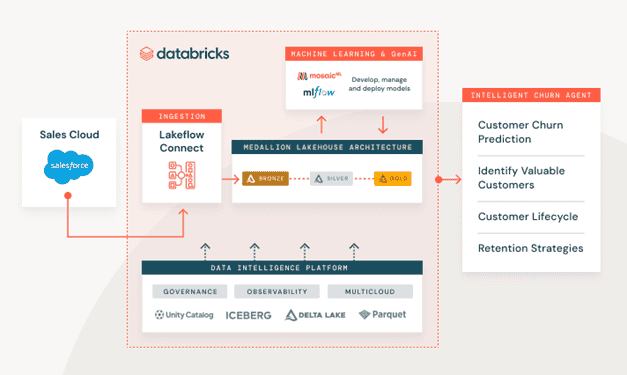
Today’s modern tech stack includes multiple data warehouses or data marts with classic SQL servers and other BI sources, e.g., Salesforce. Gathering and governing data from these sources on a single platform is a challenge. Databricks aims to solve this challenge by introducing Lakeflow Connect, a unified tool that can gather data from various sources and store it in Unity Catalog and further process and analyze the data in its data intelligence platform.
This post compares Lakeflow Connect and Azure Data Factory for ingesting Salesforce data.
Both methods have their pros and cons, and we will compare them through measurements, such as performance, maintenance, cost, and complexity.
What is Lakeflow Connect and How It Works?
With Lakeflow Connect you can create streaming pipelines to the available sources, with a simple UI, without writing any code.
Requirements
To use Lakeflow Connect there are a few requirements, such as having Unity Catalog and SQL Warehouse (specifically Serverless compute) enabled in the workspace.
In terms of permissions, if you want to create the connector, you should have CREATE CONNECTION privileges on the metastore or if you want to use an existing connector, you need to have USE CONNECTION privileges.
How Lakeflow Connect Ingests Salesforce Data
As mentioned before, we’re comparing two solutions to ingest data from Salesforce. Lakeflow Connect uses two Salesforce APIs in the background to load data. Depending on the data size, it’s either using the Salesforce REST API v63 or the Salesforce Bulk API 2.0.
The connection details are stored securely in Unity Catalog and for the API calls it is using HTTPS. For access control, you need to separate the user in Salesforce.
Limitations and Challenges of Using Lakeflow Connect
There are a few limitations and challenges when using Lakeflow Connect that we need to consider when opting for this solution. Incremental ingestion relies on the update of the cursor columns in Salesforce. Cursor columns can be SystemModstamp, LastModifiedDate, CreatedDate or LoginTime. If one is not available, Lakeflow Connect jumps to the next.
The main problem is that for formula fields, which are common in Salesforce tables, the cursor columns are not updating; therefore, these fields could be updated without changing the cursor column (e.g. SystemModstamp).
For this, Lakeflow Connect updates tables with formula fields fully in each batch, incremental ingestion for these tables is not possible currently. This limitation also appears in the other solution, as shown in the next section.
Although this is a big limitation for this connector, Databricks is actively working on solving it. If it is crucial for us to ingest the data incrementally, we might consider excluding the formula fields from the ingestion pipeline and only load the other columns, then calculate those fields inside Databricks. This requires additional development but would significantly increase performance.
Source: Databricks
Old Solution and Azure Data Factory
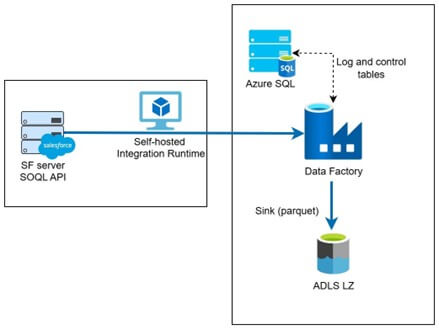
In the past, to load data from Salesforce there were mainly two solutions, both using the API connection listed above. One is to build custom code with the API, e.g., in Python and load the data through a scheduled job.
The other is using Azure Data Factory, which is a no-code solution. This method is preferred as it makes development and maintenance easier than the coded one. Both require a meta table (either Excel file or SQL table) to operate where we specify which columns and tables to load; the loading method (batch or full); and the column mapping.
The meta table contains the following columns:
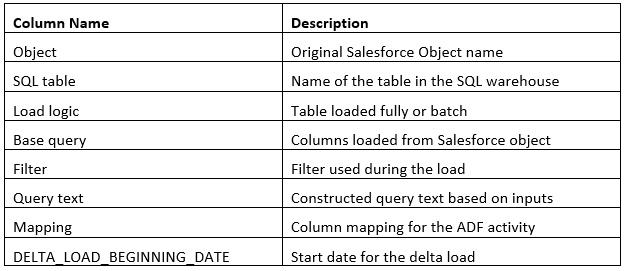
Note that this meta table and these specifications are not required in the Lakeflow Connect solution, because we specify these through the UI.
The main challenge with this solution is that it is highly complex and hard to maintain properly. To add a new table, you need to keep the meta table constantly updated. We have the same issue with formula fields here as well, since we’re using the same APIs to load the data.
Lakeflow Connect vs Azure Data Factory: Comparison
The following table shows the comparison between the two solutions:
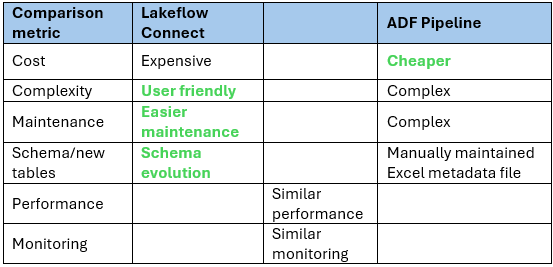
In our experiment we loaded multiple tables from Salesforce to Databricks using Lakeflow Connect and Azure Data Factory. In terms of data size, it varies, as there were bigger tables with more than 20 million rows and smaller tables. We have loaded tables both with and without formula fields.
The main difference between the two solutions is in the cost. As we can see from the table, the cost is higher for Lakeflow Connect. On average, it is 3-4 times higher in cost for each run, for Lakeflow Connect it is 30-40 USD, while the custom ADF pipeline 5-10 USD for the same tables. It is important to note that Lakeflow Connect is using Serverless cluster (of SQL Warehouse compute) and it is highly recommended to add budget policy to reduce consumption while maintaining performance.
Performance-wise, the two solutions show similar performance, but with no restrictions, Lakeflow Connect can be faster than the ADF solution. Of course, we can create a larger Integration Runtime in ADF to reduce runtime. On average, the Lakeflow pipeline took 10-20 minutes to update all tables, while the ADF pipeline 20-30 minutes for the same tables.
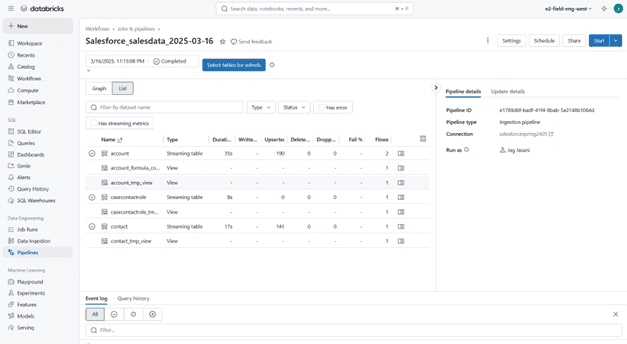
As mentioned, Lakeflow offers a better user experience and makes maintenance easier than the ADF solution, where we need to maintain a meta table to operate the pipeline. Another useful feature in Lakeflow is the implemented schema evolution. For more information on what features are implemented in Lakeflow, please check the documentation here as it varies for each connector.
Source: Databricks
In terms of optimization, currently there’s a slight edge where we can optimize ADF better to be more cost- or performance-optimized, since we can decide what VM to use. Databricks is actively working on improving Lakeflow’s developer experience and scalability.
Lakeflow Connect: Where To Improve (Roadmap and Highlights)
There are several ways to further improve Lakeflow and as mentioned above Databricks is also working on this solution currently. In their roadmap they are focusing on the following areas to improve:
- Incrementality and formula handling: reduce scenarios requiring full refresh by strengthening incremental patterns and making downstream re-computation easier and more governable.
- Performance and scalability: improve parallelization and adaptive partitioning, refine rate-limit handling, and optimize large-volume loads for higher throughput and predictable SLAs (Service Level Agreements).
- Reliability and correctness: improve schema drift and field evolution , enhance recovery from transient API issues, and improve handling for soft-delete/undelete semantics.
- Governance and observability: deepen lineage, data quality checks, and cost/performance insights; expand alerting and reporting to simplify operations at scale.
- Developer experience: broaden declarative configuration options, offer richer templates and best-practice guides, and enhance CI/CD workflows with DABs (Databricks Asset Bundles) for multi-environment promotion.
- Coverage expansion: extend support across complex object types and edge cases and continue exploring complementary integrations around Salesforce data where appropriate.
Conclusion: When to Choose Lakeflow Connect
The Lakeflow Connect solution is a good option if you need to create a new pipeline for your enterprise data platforms, databases, and cloud storage, as it is easy to develop and maintain and fits the Databricks ecosystem perfectly. If you make sure that a good budget policy is in place and constantly monitor the pipeline, you can achieve good performance while keeping the cost to a minimum.
It is important to keep in mind that this is an actively developed tool, new features may come out in the future to further improve the experience.
Struggling to decide which ingestion approach fits your needs or noticing that your pipelines aren’t running as efficiently as they could? Our experienced Databricks team can help you design, optimize, and implement the right solution for your data platform. Reach out to us and let’s solve it together!

Author of the post:
Viktor Papp - Data Engineer at Abylon Consulting. Linkedin Profile